
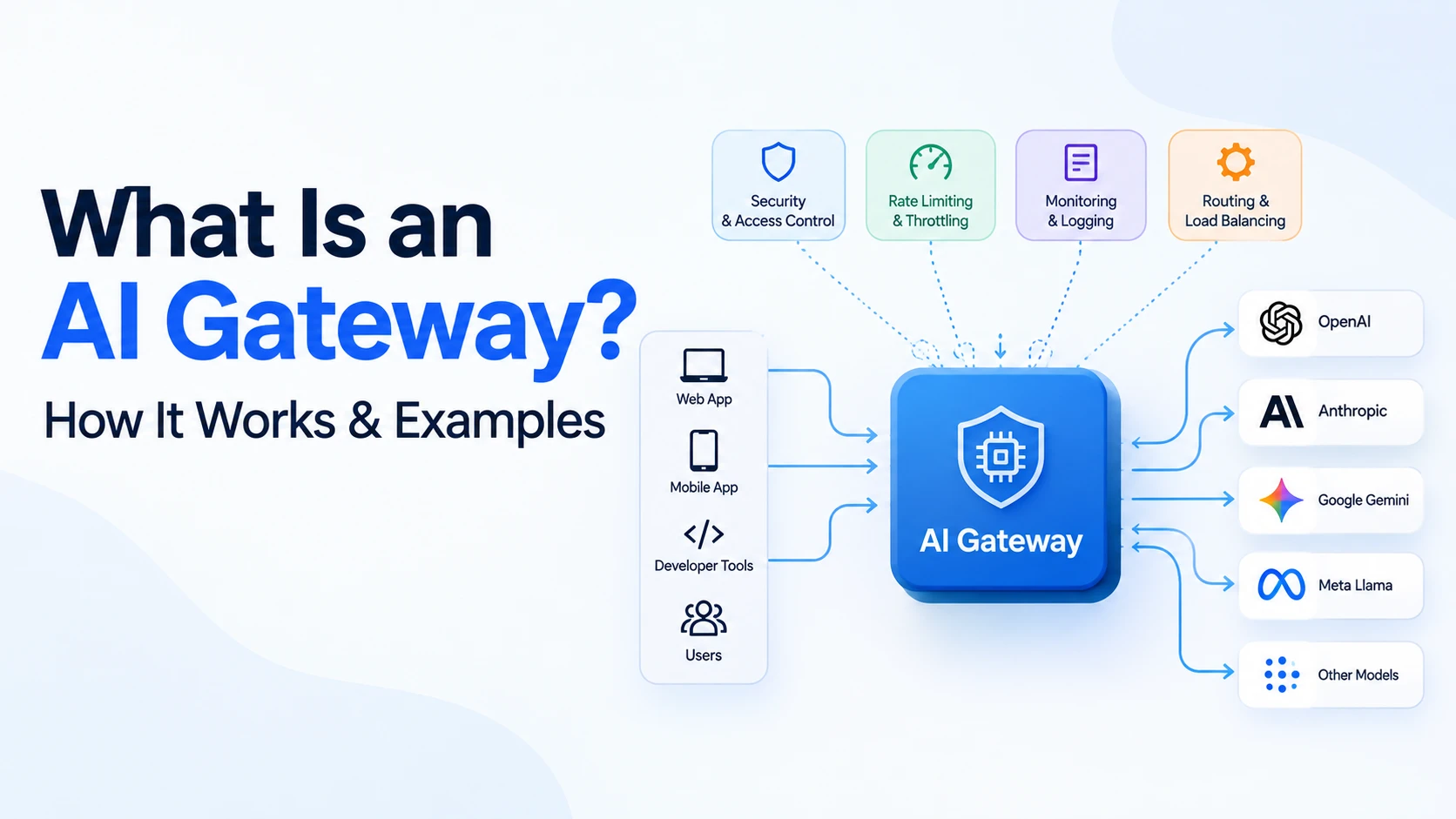
An AI gateway is an infrastructure layer that sits between your applications and the LLM providers they call (OpenAI, Anthropic, Google, self-hosted models, and others), handling routing, authentication, rate limiting, cost tracking, fallback, and observability in one place instead of scattering that logic across every application. Instead of your code calling OpenAI directly, it calls the gateway, and the gateway decides which model actually handles the request.
The difference matters once you're past a single integration. One application calling one model can hardcode an API key and move on. The moment a second team adds Anthropic for a different use case, a third starts experimenting with a self-hosted model for cost reasons, and someone asks which team spent what on tokens last month, you're maintaining provider-specific logic in several codebases with no shared view of usage, cost, or failures. An AI gateway consolidates that logic into one layer so applications talk to a single, consistent interface, and the gateway handles multiple providers underneath.
What Is an AI Gateway?
At its core, an AI gateway is a proxy purpose-built for LLM traffic. It sits in the request path between your application and one or more model providers, and it does two things: normalizes how your application talks to models, and enforces policy on every request that flows through it.
The architectural shift is simple to describe:
Without a gateway:
Application → OpenAI
Application → Anthropic
Application → Self-hosted model

With a gateway:
Application → AI Gateway → Model Router → OpenAI / Anthropic / Google / Self-hosted
Without a gateway, each provider integration lives inside the application: separate SDKs, auth, error handling, retry logic. With a gateway, the application makes one kind of call, usually OpenAI-compatible, and the gateway decides where it actually goes.
A basic architecture looks like this:
┌─────────────┐
│ Application │
└──────┬──────┘
       │
       ▼
┌─────────────┐
│  AI Gateway │  ← auth, rate limits, logging, policy
└──────┬──────┘
       │
       ▼
┌─────────────┐
│Model Router │  ← decides which model/provider handles the request
└──────┬──────┘
       │
┌──────┴───────┬──────────────┬───────────────┐
▼              ▼              ▼               ▼
OpenAI      Anthropic      Google        Self-hosted
Model        Model          Model          Model
The application is unaware of which provider ultimately serves the request. The gateway handles authentication, applies rate limits, and logs the request. The model router applies the actual routing decision, based on a static config, cost, latency, or availability. The providers below it are interchangeable from the application's point of view.
This matters most once an organization uses more than one model or provider, which today is closer to the default than the exception, since teams pick different models for different jobs and providers have outages, rate limits, and pricing changes no single application should handle on its own.
Why Do We Need an AI Gateway?
Direct integration works fine for a prototype. It starts breaking down at production scale for a specific set of reasons.
Every provider has a different API shape. OpenAI, Anthropic, and Google each have their own formats, auth headers, and error codes, so an application calling all three ends up maintaining three separate code paths.
Rate limits and outages become the application's problem. Without fallback logic, a throttled or down provider means users see failures, and handling that gracefully inside every application is a lot of duplicated logic.
Cost visibility disappears. When several teams each call their own provider with their own API keys, nobody has a single answer to how much the company is spending on AI, broken down by team or feature.
Security and governance get inconsistent. Without a shared enforcement point, one team might log full prompts and responses while another logs nothing, with no consistent way to say which models are approved for use.
Switching models becomes a migration project. A cheaper or better model called directly from ten codebases means touching all ten to switch; behind a gateway, it can be a configuration change.
A realistic example: a mid-sized company has a support chatbot calling OpenAI directly, an internal tool calling Anthropic directly, and a new feature calling a self-hosted model, each built by a different team with its own key, its own logging, and no shared cost dashboard. When a provider has an outage, only the team that notices fixes it. This is the specific set of problems an AI gateway exists to solve.
How Does an AI Gateway Work?
Walking through a single request end to end makes the architecture concrete.
- The application sends a request to the gateway instead of directly to a model provider, typically in an OpenAI-compatible format.
- The gateway authenticates the request against the applications and teams allowed to use it.
- The gateway validates policy: whether this application can call this model, whether the request violates any data policy, and whether rate limits are exceeded.
- The gateway determines the target model or provider, based on a specific request, a task-type rule, or a fallback chain.
- Routing rules are applied, such as load balancing, cost-aware routing to a cheaper model, or geographic routing.
- The gateway forwards the request, translating it into the provider's specific format if needed.
- The model returns a response, as a single payload or a stream.
- The gateway logs the request and response, capturing token counts, latency, cost, and any policy actions taken.
- The gateway returns the response, usually in the same format regardless of which provider served it.
- If something failed (timeout, rate limit, provider error), the gateway can retry, fail over, or return a clear error rather than a raw provider-specific one.
A single-provider setup might do minimal routing; a multi-provider enterprise setup does real work at nearly every step.
AI Gateway Architecture
From a solution architecture standpoint, an AI gateway is made of a handful of core components plus a longer list of optional capabilities that vary by product.
Core components, present in nearly every AI gateway: an API endpoint applications call, usually OpenAI-compatible; authentication and authorization verifying who's calling and what they can do; a model router deciding which model or provider handles a request; a provider abstraction layer translating normalized requests into each provider's format; request validation; and logging of what was requested, returned, and cost.
Common but not universal capabilities, which vary by product: load balancing across deployments or regions, token-level rate limiting, retry and failover handling, caching (including semantic caching for similar prompts), guardrails and PII filtering, prompt policies like templating, metrics and tracing exported to an existing stack, cost tracking attributed to a team or customer, durable audit logs, and secrets management so provider keys live in one secured place instead of every application.
A conceptual view of how these fit together:
                    ┌────────────────────────┐
                    │      AI Gateway         │
                    │                         │
  Request ────────▶ │  Auth → Validate →      │
                    │  Rate Limit → Router    │
                    │                         │
                    │  Cache, Guardrails      │────▶ Provider(s)
                    │  Cost Tracking          │
                    │  Logging / Tracing      │
                    └────────────────────────┘
                              │
                    Observability / Audit Logs
Not every gateway implements every box in that diagram. Some are lightweight routers with almost no policy layer. Others are full platforms with guardrails, evaluation, and governance built in. Knowing which components you actually need is more useful than assuming any given product has all of them.
Key Features of an AI Gateway
Multi-Model Routing
Routing can be based on the task itself (classification versus open-ended reasoning), cost targets, latency, context length, output quality, current availability, or attributes of the caller like organization or region. A support application, for example, might route simple FAQ questions to a smaller, faster model and escalate to a larger one only when the conversation gets complex, keeping average cost and latency down without sacrificing quality where it matters.
Multi-Provider Support
A gateway abstracts the differences between OpenAI, Anthropic, Google, Azure- or AWS-hosted models, and self-hosted open-weight models behind one interface. This avoids full dependence on a single vendor's pricing and roadmap, lets a team pick the best model per task, and means a provider outage doesn't necessarily mean an application outage.
Fallback and Failover
When a provider is unavailable, a model hits its rate limit, or latency crosses an unacceptable threshold, a gateway with fallback configured routes the request to a secondary model instead of failing outright, usually as a primary model with one or more fallbacks in a defined order. Cloudflare's AI Gateway, for example, supports configurable automatic retries with adjustable count and backoff strategy, plus dynamic routing across providers for more complex failover.
Rate Limiting
Rate limiting for LLM workloads differs from typical API rate limiting: counting requests per minute isn't meaningful when one request uses 50 tokens and another uses 50,000. LLM-aware rate limiting typically tracks tokens per minute instead of, or alongside, request counts, applied per user, application, or organization. Azure API Management's token limit policy, for instance, sets token-per-minute limits keyed by subscription or custom identifier, and can estimate prompt tokens before the request reaches the model to avoid a wasted call.
Cost Management
This covers tracking token usage per request, accounting for very different per-token costs across models, setting budget limits, attributing spend to a team or customer, and cost-aware routing that sends simple requests to cheaper models while reserving expensive ones for work that needs them. A document pipeline, for example, might use a cheap model for an initial classification pass and only send documents needing deep analysis to a more capable, more expensive model.
Observability
AI-specific observability covers request logs, token usage, latency, error rates, model and provider performance over time, cost per request, and tracing through multi-step workflows. It differs from conventional API monitoring in a real way: a 200 response doesn't tell you whether the output was actually good, so observability here has to look past HTTP status codes into token counts and cost per outcome.
Security and Governance
A gateway can help enforce authentication, manage API keys centrally, apply PII detection or redaction, screen prompts for injection patterns, restrict which models an application can access, and keep an audit log. What it doesn't do on its own is make an application secure: it enforces the policies you configure, but writing good policies and reviewing audit logs is still work someone has to do, and prompt injection defenses reduce risk without eliminating it. Treat an AI gateway as one layer in a security program, similar to how AI governance vs AI compliance covers the broader distinction between policy and enforcement.
AI Gateway vs API Gateway
This comparison is worth being precise about, since the terms get used loosely.
| Capability | API Gateway | AI Gateway |
|---|---|---|
| HTTP routing | Yes | Sometimes, secondary to model routing |
| Authentication | Yes | Yes |
| Rate limiting | Yes, request-based | Yes, typically token-aware |
| Load balancing | Yes, across backend services | Yes, across model deployments/providers |
| LLM/model routing | No | Yes, core function |
| Token usage tracking | No | Yes |
| AI cost tracking | No | Yes |
| Model fallback | Generic service failover only | Model- and provider-aware fallback |
| Prompt policies | No | Yes |
| LLM observability | No, generic HTTP metrics only | Yes, token/latency/cost-aware |
| Provider abstraction | Not model-specific | Yes, core function |
| AI-specific governance | No | Yes |
A traditional API gateway (Kong, Apigee, or AWS API Gateway in general-purpose form) is built for HTTP services broadly. An AI gateway is purpose-built for the specific shape of LLM traffic: token-based costs, model-specific formats, and routing between interchangeable models rather than fixed backend services.
An AI gateway isn't necessarily a replacement for an existing API gateway. Many organizations run both, with the API gateway handling general traffic at the edge and the AI gateway handling the AI-specific layer behind it:
Client
  │
  ▼
API Gateway        ← general HTTP routing, auth, edge rate limiting
  │
  ▼
Application/API     ← business logic
  │
  ▼
AI Gateway          ← model routing, token tracking, AI-specific policy
  │
  ▼
LLM Providers
Separating these responsibilities keeps each layer focused: the API gateway doesn't need to understand tokens or models, and the AI gateway doesn't need to handle every other kind of traffic. Some products, including Kong AI Gateway and Azure API Management's GenAI capabilities, blur this line by adding AI-specific policies onto an existing general-purpose gateway, a legitimate alternative to running two separate systems.
AI Gateway vs LLM Gateway
"AI gateway," "LLM gateway," "model gateway," and "AI API gateway" are used somewhat interchangeably, with no single universally agreed definition. "LLM gateway" usually describes a product focused specifically on large language model traffic, "AI gateway" sometimes extends more broadly to other AI workloads like image generation, and "model gateway" tends to show up in more infrastructure-focused contexts closer to model-serving itself. Don't read too much into the naming; look at what a specific product actually does.
AI Gateway vs Direct LLM API Calls
Direct integration (Application → OpenAI/Anthropic/Google) is simpler to set up initially: no extra infrastructure, no added network hop, no additional system to learn. For one application calling one provider, this is often the right choice, at least at first.
Gateway-based architecture (Application → AI Gateway → Multiple Providers) adds infrastructure but centralizes routing, cost tracking, observability, and policy enforcement instead of duplicating that logic everywhere, at the cost of a small added latency and a new component that itself needs to stay reliable.
Direct integration tends to win with one application, one provider, and low enough scale that centralized governance isn't yet a real problem. A gateway tends to win once there are multiple applications, multiple providers, or a real need for centralized cost, security, or reliability controls. Most organizations start with direct integration and adopt a gateway once that complexity becomes visible.
Real-World AI Gateway Examples
LiteLLM is an open-source proxy and Python SDK offering an OpenAI-compatible interface to more than 100 LLM providers. Commonly self-hosted, its router handles load balancing, retries, and fallbacks, including per-key and per-team settings and budget-based fallbacks. Best suited for teams wanting a self-hostable, deeply configurable gateway they're comfortable operating.
Portkey is a commercial AI gateway and observability platform supporting hundreds of LLMs through a unified API, with built-in guardrails, semantic and simple caching, fallbacks, load balancing, and prompt management, plus an MCP Gateway for governing AI agent tool access. Suited for teams wanting a full-featured managed platform rather than a self-hosted proxy.
Kong AI Gateway extends Kong's existing API gateway with AI-specific plugins: multi-LLM proxying, prompt guard and semantic prompt guard, semantic caching backed by a vector database, token-based rate limiting, and LLM-specific load-balancing algorithms. A natural fit for organizations already running Kong, though several advanced AI plugins require enterprise licensing.
Cloudflare AI Gateway is a managed, edge-deployed gateway offering analytics, caching, rate limiting, retries, and model fallback, with core features free on all plans. It provides a unified REST API, an OpenAI-compatible endpoint fronting multiple providers, dynamic routing for cross-provider failover, and a Data Loss Prevention feature. Strong for teams already on Cloudflare's network wanting a low-setup, edge-based option.
Azure API Management's GenAI gateway capabilities extend Azure API Management with LLM-specific policies: a token limit policy enforcing tokens-per-minute quotas (with prompt token pre-calculation), token metric emission to Application Insights, load balancing, circuit breaking, and semantic caching. It also imports models from the Azure AI Foundry catalog. The natural choice for organizations already standardized on Azure API Management.
Google Cloud's API Gateway model routing, a newer capability announced in 2026, accepts OpenAI-compatible prompt requests and routes them to models in Vertex AI Model Garden, including Gemini, Anthropic Claude, and OpenAI GPT-family models. Google positions it as a managed alternative to a self-hosted proxy like LiteLLM, with routing defined through OpenAPI 3.x extensions. Fits teams standardized on Vertex AI Model Garden.
Amazon Bedrock doesn't market a standalone "AI gateway," but offers related capabilities natively: cross-Region inference profiles that distribute requests across AWS Regions for throughput, application inference profiles for cost allocation, and Bedrock Guardrails for content filtering. AWS's own documentation notes cross-Region inference is a throughput mechanism, not failover against an outage, so teams wanting true multi-provider failover on AWS typically still add a dedicated gateway in front of Bedrock.
These differ mainly in deployment model (self-hosted versus managed), how deep their AI-specific policy features go, and which cloud ecosystem they're built closest to, not in one being categorically "best."
AI Gateway Use Cases
Multi-model AI application. One application uses different models for different features, a fast model for autocomplete-style suggestions and a stronger one for full documents, routed through a single gateway rather than separate integration code per model.
Cost optimization. Simple, high-volume requests route to a cheaper model, while complex or high-stakes ones are reserved for a more capable one, keeping average cost down without a blanket downgrade in quality.
High availability. Traffic shifts automatically to a fallback provider when the primary one is down or rate-limited, so a single outage doesn't become an application-wide one.
Enterprise AI governance. Centralized policies control which models teams, applications, or employees can access, with usage logged for audit purposes, which matters as more AI agents start calling models directly.
AI SaaS platform. A SaaS company offering AI features to many customers needs accurate per-tenant usage and cost tracking, since AI features without cost attribution are hard to price sustainably.
Model evaluation. Traffic is intentionally split across models to compare quality, latency, or cost in production before committing to one, using the gateway's routing and logging instead of a separate evaluation harness.
Benefits of Using an AI Gateway
Centralized traffic management means one place to configure policy instead of duplicating it. Multi-provider flexibility lets you choose the best model per task instead of being locked into one provider. Reduced vendor lock-in matters when pricing or capability changes make switching worth doing, since a gateway turns that into a config change rather than a rewrite. Better reliability comes from fallback and retry logic that doesn't need to live in every application. Cost optimization comes from spend visibility plus the ability to route cheap work to cheap models. Centralized security means credentials and access rules live in one enforced place instead of being reimplemented per team.
Better observability gives a real picture of usage, latency, and cost across the organization rather than per-application blind spots. Easier model switching turns a migration into a routing change. Usage tracking supports accurate cost attribution. Governance gives a consistent way to say which models are approved for which use cases. Simplified application architecture means code doesn't need provider-specific logic. And operational scalability means adding a provider or model doesn't require touching every application that uses it.
None of this is automatic. A gateway with no routing rules configured doesn't optimize cost by itself, and one with no guardrails doesn't improve security by itself. The benefit shows up when the policies are actually built and maintained, not from installing the gateway.
Limitations and Challenges of AI Gateways
A gateway is additional infrastructure that has to be deployed, scaled, and kept available, and it becomes a new potential point of failure between your applications and every model they use. It adds a small amount of network latency, and running one (self-hosted or managed) has a real operational or direct cost, with routing, fallback, and rate-limit configuration needing ongoing tuning, not a one-time setup.
Provider-specific features don't disappear just because a gateway sits in front of them; a model's newest capability may still need custom handling if the gateway's abstraction layer doesn't yet support it. Security responsibilities don't go away either: a gateway enforces the policies you give it, it doesn't invent good ones. It also doesn't fix bad prompts or poor model selection; routing a badly designed request to a better model just gets a more expensive bad answer. And there's a subtler lock-in worth naming: a gateway's own configuration format or hosted platform can itself become hard to migrate away from.
An AI gateway may simply be unnecessary for a small application calling one provider at modest volume. The overhead isn't worth it until the problems it solves (multi-provider complexity, cost visibility, centralized governance) actually exist in your situation.
When Should You Use an AI Gateway?
An AI gateway is probably useful when:
- You use more than one LLM provider
- You need centralized policies across multiple applications or teams
- You're operating at meaningful scale, in traffic or cost
- AI spend needs to be tracked and attributed
- You need automatic failover between models or providers
- You need centralized observability instead of per-application logging
- Multiple applications share the same AI infrastructure
- You run an AI SaaS platform with per-customer usage and cost needs
You may not need one when:
- You have a single small application
- You use exactly one model provider
- Traffic volume is low
- You don't need centralized governance yet
- Operational simplicity matters more right now than routing flexibility
A simple decision path: if you're calling more than one provider, or more than one application needs to share AI infrastructure, or you're being asked questions about AI cost or governance you can't currently answer, a gateway is worth evaluating. If none of that applies yet, direct integration is a reasonable starting point, and you can add a gateway later without a full rewrite, since the application-facing interface (an OpenAI-compatible API call) typically doesn't change much when a gateway is introduced behind it.
How to Choose an AI Gateway
When evaluating options, check: which providers and models are supported, whether it exposes an OpenAI-compatible API, its routing and failover capabilities, how rate limiting works (token- versus request-based), how cost and usage tracking is exposed, its observability integrations, what security and guardrail features are built in versus need adding, how it handles data privacy (where logs and prompts are stored, for how long), deployment options (self-hosted, managed, or both), Kubernetes support, enterprise support and SLAs, pricing, how much lock-in it creates, and how extensible it is for provider-specific needs.
Startups typically weigh setup speed, cost, and simplicity most heavily, often favoring a managed option or a lightweight self-hosted proxy. Enterprises typically weigh governance, audit logging, SLAs, and integration with existing identity and observability systems more heavily, even at higher cost.
How to Implement an AI Gateway
A conceptual approach, independent of which product you choose: identify the AI providers your applications currently use or plan to use; define requirements around expected traffic, latency tolerance, and which teams need access to which models; select a gateway architecture (self-hosted, managed, or hybrid); configure authentication for both applications and providers; configure model routing, including where dynamic or cost-aware routing makes sense; define token-aware rate limits at the application, user, or organization level; connect observability to wherever your team already monitors production; add fallback policies defining primary and secondary models; add cost controls including budgets and attribution tags; add security policies for PII detection and data handling; deliberately test failure scenarios like a simulated provider outage or rate limit hit; and monitor production traffic after rollout, adjusting rules based on what actually happens rather than initial assumptions.
Example AI Gateway Architecture for an Enterprise
A realistic enterprise setup layers an AI gateway behind an existing API gateway and application tier:
Users
  │
  ▼
Web / Mobile Applications
  │
  ▼
API Gateway                 ← edge auth, general rate limiting, routing
  │
  ▼
AI Application Services      ← business logic, prompt construction
  │
  ▼
AI Gateway
  │
  ▼
Policy Engine                ← governance rules, access control
  │
  ▼
Model Router
  │
┌─────┴──────┬─────────────┬──────────────┐
▼            ▼             ▼              ▼
OpenAI    Anthropic     Google        Self-hosted
Supporting systems around this core path include observability across both gateway layers, cost management aggregating spend across providers, durable audit logs for compliance review, a secrets manager holding provider credentials, and analytics feeding usage patterns back into routing decisions. Each layer has one job: the API gateway handles general traffic, the application layer owns business logic, the AI gateway and policy engine own AI-specific routing and governance, and the model router makes the final call on where a request goes. This mirrors how many organizations structure their broader AI infrastructure, separating concerns rather than routing everything through one monolithic component.
AI Gateway Best Practices
Keep provider abstraction clean, resisting the urge to special-case provider quirks throughout application code. Avoid unnecessary complexity: don't configure elaborate routing rules you don't yet need. Use explicit routing policies rather than implicit defaults that are hard to reason about later. Track token usage from day one, since retrofitting cost visibility after a cost problem exists is harder than building it in.
Monitor cost per application or customer, not just a total. Implement failover before you need it, not after your first real outage. Set rate limits based on actual usage rather than arbitrary numbers. Secure provider credentials in a secrets manager, not application config files. Log responsibly, being deliberate about retaining full prompts and responses given what users might type into them. Test provider failures on purpose in a non-production environment. Monitor latency at the gateway layer specifically, since it can mask or add to model latency. Version routing policies so changes can be rolled back. Avoid relying on a single model even with one provider. And review model performance and cost regularly, since both shift as providers update pricing and capabilities.
Frequently Asked Questions About AI Gateways
What is an AI gateway?
An infrastructure layer between applications and LLM providers that handles authentication, routing, rate limiting, fallback, cost tracking, and observability for AI traffic in one place instead of duplicating that logic inside every application.
What does an AI gateway do?
It authenticates requests, routes them to the right model or provider, enforces rate limits and policies, tracks token usage and cost, handles fallback when a provider fails, and logs traffic for observability and auditing.
Is an AI gateway the same as an API gateway?
No. A traditional API gateway handles general HTTP routing, auth, and rate limiting for any backend service. An AI gateway is purpose-built for LLM traffic, adding model routing, token-based rate limiting, and provider abstraction.
Why do companies use AI gateways?
Once they're using multiple LLM providers or models, need centralized cost tracking, want consistent security and governance policies, or need automatic failover so one provider outage doesn't take down the application.
Does an AI gateway reduce LLM costs?
It can, mainly through cost-aware routing to cheaper models, caching repeated requests, and spend visibility that surfaces waste. It doesn't reduce cost automatically without those policies configured.
Can an AI gateway connect multiple LLM providers?
Yes, this is a core reason organizations adopt one, typically routing to OpenAI, Anthropic, Google, Azure- or AWS-hosted models, and self-hosted models through a single API.
Does an AI gateway improve AI security?
It can help enforce policies like authentication, PII detection, and prompt filtering, but doesn't make an application secure on its own. Writing good policies and keeping them current is still necessary work.
Is an AI gateway necessary for a small application?
Usually not. A single application calling one provider at low volume typically doesn't need the added infrastructure. It becomes more valuable as providers, applications, or governance needs multiply.
What is an LLM gateway?
Used largely interchangeably with "AI gateway," usually describing a product focused specifically on routing large language model traffic rather than other AI workloads like image generation.
What are examples of AI gateways?
LiteLLM, Portkey, Kong AI Gateway, and Cloudflare AI Gateway, alongside AI-specific capabilities in Azure API Management and Google Cloud API Gateway, and gateway-adjacent features native to Amazon Bedrock.
Can AI gateways route requests between different models?
Yes, this is a core function known as model routing, based on task type, cost, latency, availability, or explicit rules.
Does an AI gateway add latency?
A small amount, from the extra network hop, usually minor compared to model inference time but worth measuring rather than assuming negligible.
Key Takeaways
- An AI gateway sits between applications and LLM providers, centralizing routing, authentication, rate limiting, cost tracking, and observability instead of duplicating that logic across every application.
- It becomes valuable once an organization uses multiple models or providers, not necessarily from day one with a single integration.
- An AI gateway is distinct from a traditional API gateway: it's purpose-built for token-based costs, model-specific formats, and routing between interchangeable models.
- Core capabilities include authentication, model routing, and provider abstraction; features like caching, guardrails, and advanced observability vary significantly between products.
- A gateway can help enforce security and governance policies, but it doesn't make an application secure or well-governed by itself; the policies still have to be built and maintained.
- Real products like LiteLLM, Portkey, Kong AI Gateway, Cloudflare AI Gateway, and cloud-native options from Azure, Google Cloud, and AWS take meaningfully different approaches to deployment model and depth of AI-specific features.
- Adopting a gateway adds infrastructure, a small amount of latency, and configuration overhead, so it's worth adopting when the problems it solves are real, not by default.
Conclusion
An AI gateway earns its place in an architecture at a specific point: when an organization moves from experimenting with a single model in a single application to operating multiple models, multiple providers, multiple applications, and real production traffic with real cost and reliability requirements. Before that point, the extra infrastructure is often more overhead than benefit. After it, the alternative (that same routing, cost tracking, and failover logic scattered across every application that calls a model) tends to become the more expensive option, just in a less visible way.
If you're running one application against one provider today, direct integration is still a reasonable choice, and you can introduce a gateway later without a major rewrite. If you're already juggling more than one provider, fielding questions about AI spend you can't answer precisely, or building governance policy that needs a real enforcement point, that's the signal to evaluate one of the options covered here against your specific requirements rather than your assumptions about what "everyone" is using.